What you can download today
The macOS package is Hollow.app (.zip). Download for macOS. The homepage describes it as a native macOS workspace for browser profiles, identity signals and cookie tools. Hollow does not publish a minimum macOS version, a RAM figure, or a separate Intel installer.
A Windows app download is not available yet. This page stays on the Mac app. Paid checkout is not active, and the product is not sold from this URL.
How to open Hollow on macOS
The download is Hollow.app inside Hollow-macOS.zip. The site does not publish a checksum. Open the app with these steps:
- Unzip
Hollow-macOS.zipand moveHollow.appto Applications. - Control-click
Hollow.appand choose Open. - If macOS still blocks it, open System Settings → Privacy & Security and click Open Anyway.
What each Mac profile isolates
Each profile can have its own settings, color badge, window geometry and a dedicated browser data directory. Ordinary Chrome or Safari profiles separate cookies and site storage. They still share the machine fingerprint and usually the same IP. Hollow adds fingerprint controls and an optional proxy and geo identity on top of that separation.
Cookie Studio imports and exports Netscape or JSON jars. In a running profile you can inspect, delete, clear or export cookies. Imports made while the profile is stopped are encrypted in offline staging and hydrated via CDP before the next launch.
Proxy route locks use HTTP CONNECT or SOCKS5h, with XChaCha20-Poly1305 encrypted write-only credentials, automatic retry on transient upstream drops, a Require proxy lock, and the verified egress IP captured on launch. Require proxy blocks an accidental direct connection. Non-proxied WebRTC UDP and QUIC are suppressed automatically. Geo Identities bundle timezone, Accept-Language, GPS coordinates and claimed OS, and can match language and timezone to the verified proxy egress country.
Stopped profiles can be exported as portable archives (settings, fingerprint seeds, geo identities, staged cookies and Require-proxy locks) and inspected before import. The origin-pinned Secret Vault stores encrypted usernames, passwords, TOTP secrets and tokens, injected locally and not exposed to LLM prompts.
Hardware and fingerprint controls on a Mac
Each profile has five tabs: Overview, Agent, Browser, Cookies and Fingerprint. You can apply 16 curated hardware blueprints and 30 crowd-blending Chrome 157/158 and Edge 157/158 presets across macOS, Windows, Linux and Android. The site names macOS M1–M4 Pro, Windows RTX 3060/4060/4070 / RX 7600 / Intel UHD / Iris Xe, Linux Mesa, and Android Pixel 9 and Galaxy S25 among those presets.
Manual controls on the site include CPU cores / hardwareConcurrency (1–128), RAM / deviceMemory, logical screen resolution (200–16384 px), PCI-ID ANGLE WebGL strings, OS-aligned JS font allowlists, 48-key keyboard layout maps, a user-agent string with Sec-CH-UA alignment, and Navigator properties. Hollow warns if a user-agent conflicts with an attached Geo Identity. Optional 64-bit noise covers Canvas 2D, AudioContext, DOM ClientRects and MediaDevices, injected across main documents, iframes and Web Workers, with WebGL canvas isolation. Hollow does not publish a test that a Windows preset on a Mac is as consistent as a macOS preset.
More of the same controls are on the profile settings section of the homepage.
Inspect the profile before you rely on it
The 27-check live Fingerprint Inspector checks a running profile for inconsistencies. It does not certify stealth. The 4-pillar, 10-gate Coherence Audit scores IP & Network, Transport Wire, Browser & Hardware, and Storage Maturity. It can run offline or live via CDP, and it includes workspace IP-collision checks.
Selective WAF purge clears stale third-party clearance tokens (such as Cloudflare, DataDome or Akamai) while preserving site login cookies. Configuring browser signals does not guarantee anonymity or bypass of third-party detection; verify each setup before relying on it.
Built-in agents and MCP, on the same profiles
The built-in Profile Agent runs multi-step browser tasks inside a profile, with live SSE step events. It can use local Ollama, vLLM or LM Studio, or hosted OpenRouter or OpenAI. The homepage demo describes a run with Local Ollama Vision (qwen2.5-vl:32b). A separate MCP setup guide is not published on this site; the automation section on the homepage is the short version.
Hollow exposes 63 native stdio MCP tools (hollow-mcp) for Claude Desktop, Cursor, Codex or a custom agent. The loopback REST API is at 127.0.0.1:8787, with revocable profile-scoped hlw_tok_ bearer tokens and a built-in localhost web panel. Stateful sessions use 14 typed verbs (click, fill, press, select, toggle, hover, scroll, wait, tab management, file upload, dialogs and screenshots) and a filtered network tap. Hybrid Playbooks record steps and keep selector repairs quarantined until you promote or discard them. Fleet Batches run that work across more than one profile. The homepage snippet is:
{
  "mcpServers": {
    "hollow": {
      "command": "/Applications/Hollow.app/Contents/Resources/hollow-mcp",
      "env": { "HOLLOW_API_URL": "http://127.0.0.1:8787" }
    }
  }
}
Planned pricing
Paid checkout is not active yet. The planned subscription is US$9.99 per month, with an access key intended after purchase. The same figures are on the homepage download section. This site does not publish a price comparison with other browsers.
Hollow and other Mac anti-detect browsers
Hollow is a local-first Mac workspace: profiles you can inspect, fingerprint controls you can read, and native MCP tools plus a built-in Profile Agent on those same profiles. An agent task and a check you run by hand can share one data directory, one proxy lock and one fingerprint setup. It is not a cloud suite, and it does not claim to be the best anti-detect browser for Mac.
This site does not publish a comparison with Multilogin, GoLogin or AdsPower, and it does not publish benchmark scores. Read the Hollow homepage for the product as it is described today, and use the inspector on your own profile before you rely on a setup.
What Hollow does not promise
Hollow is designed for profile separation and configuration visibility; it does not guarantee anonymity or bypass of third-party detection. Always verify the behavior of your own setup. The 27-check inspector checks inconsistencies; it does not certify stealth.
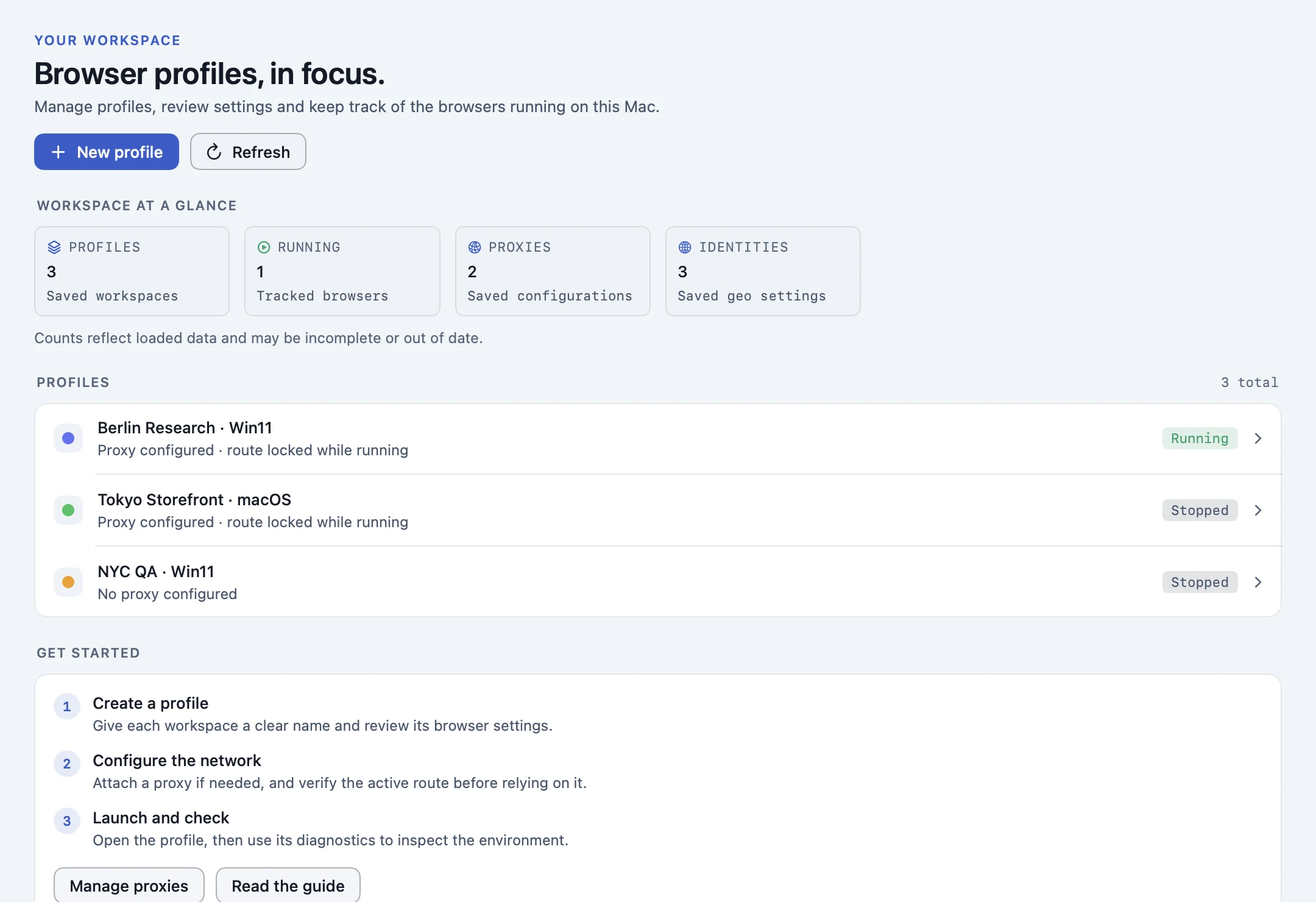
Product images are captures of the macOS Hollow interface rendered with an offline preview model. The site does not list a separate Intel Mac build. A Windows app download is not available yet.
Questions
What is the best anti-detect browser for a Mac?
Hollow is a local-first browser workspace for macOS with isolated profiles, fingerprint controls and MCP tools. It does not claim to be the best anti-detect browser for Mac, and this site does not publish a ranking or a comparison with other products.
Does Hollow work on Apple silicon, including M1, M2, M3 and M4?
Hollow's hardware presets include macOS M1, M2, M3 and M4 Pro profiles. The macOS download is a single Hollow.app zip. The site does not publish a separate Apple silicon installer or a minimum macOS version.
Does Hollow work on Intel Macs?
The site lists one macOS download, Hollow-macOS.zip, and does not list a separate Intel Mac build. It also does not say whether that zip runs on Intel Macs or under Rosetta.
Is there a Windows version?
Not yet. Hollow for Windows is planned, but the site does not offer a Windows download today. This page is about the Mac download.
How do I download and open Hollow on macOS?
Unzip Hollow-macOS.zip and move Hollow.app to Applications. Control-click Hollow.app and choose Open. If macOS still blocks it, open System Settings → Privacy & Security and click Open Anyway.
What does an anti-detect browser do on a Mac?
An anti-detect browser keeps separate profiles, each with its own fingerprint settings, cookies and optional proxy, instead of one shared browser profile. Hollow gives each profile its own settings, data directory and fingerprint controls. It does not claim that this hides you from every site.
Can I customise user agents and fingerprint signals?
Yes. Profiles support 16 curated hardware blueprints and 30 crowd-blending Chrome 157/158 and Edge 157/158 presets, custom user-agent strings with Sec-CH-UA alignment, fonts, a 48-key keyboard layout, CPU, RAM, WebGL and screen settings, and deterministic 64-bit noise controls. The 27-check fingerprint inspector checks a running profile for inconsistencies; it does not certify stealth.
How much does Hollow cost?
Paid checkout is not active yet. The planned subscription is US$9.99 per month, with an access key intended after purchase.
Can I use Hollow with Claude, Cursor or Codex?
Yes. Hollow exposes 63 native stdio MCP tools (hollow-mcp) for Claude Desktop, Cursor, Codex or a custom agent. It also includes a built-in Profile Agent that can use local Ollama, vLLM or LM Studio, or hosted OpenRouter or OpenAI. The loopback API is at 127.0.0.1:8787.
Does Hollow guarantee anonymity or that I will bypass detection?
No. Hollow is designed for profile separation and configuration visibility; it does not guarantee anonymity or bypass of third-party detection. Always verify the behavior of your own setup.
Is Hollow a cloud antidetect suite?
No. Hollow is a local-first workspace. Profiles, the loopback API at 127.0.0.1:8787 and the MCP server are local. Vault secrets are injected locally and are not exposed to LLM prompts.
How is Hollow different from ordinary Chrome or Safari profiles?
Ordinary browser profiles separate cookies and site storage, and they still share the machine fingerprint and usually the same IP. Hollow gives each profile its own settings, color badge, window geometry, dedicated browser data directory, fingerprint controls, and an optional proxy and geo identity.
What is Hollow?
Hollow is a browser workspace with anti-detect-oriented profile controls, user-agent and fingerprint settings, 4-pillar, 10-gate coherence audits, selective WAF token purging, encrypted cookies, portable archives, proxies, an origin-pinned Secret Vault, and AI and MCP automation tools for macOS and Windows. The macOS download is Hollow.app in a zip.
How do proxies, route locks and geo identities work?
Each profile supports HTTP CONNECT and SOCKS5h proxies with encrypted write-only credentials and automatic retry on transient upstream drops. Launch persists the verified egress IP onto the profile, Require proxy prevents accidental direct launches, non-proxied WebRTC UDP and QUIC are suppressed automatically, and Geo Identities bundle timezone, language and GPS coordinates.
How does cookie management work?
You can import Netscape or JSON cookie files. In a running profile, you can inspect, delete, clear or export cookies. Imports made while the profile is stopped are encrypted in offline staging and hydrated via CDP before the next launch.
What automation tools are included?
Hollow ships with a built-in Profile Agent (with live step_started/task_finished SSE streaming, non-JSON HTTP diagnostic capture, and one-click /agent/config/health endpoint probes for Ollama, vLLM, LM Studio, OpenRouter, OpenAI and Browser Use Cloud), stateful CDP sessions with 14 typed verbs and filtered Network Taps, record-and-replay Hybrid Playbooks with quarantined selector heals, Fleet Batches, a 63-tool stdio MCP server (hollow-mcp), a built-in localhost web panel, and a loopback REST API (127.0.0.1:8787) with scoped hlw_tok_ tokens.
Can I download Hollow today?
Yes. The macOS package is Hollow.app inside Hollow-macOS.zip. A Windows app download is not available yet. Paid checkout is not active yet.
When can I purchase a subscription?
Paid checkout is not active yet. The planned subscription is US$9.99 per month, with an access key intended after purchase.
What do the product images show?
These are captures of the macOS Hollow interface rendered with an offline preview model.